
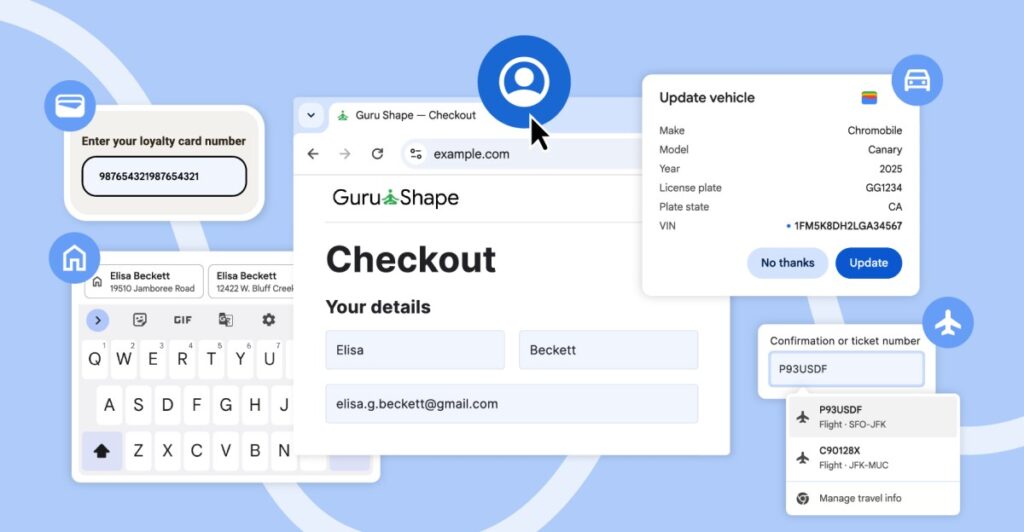
Google has recently introduced several autofill enhancements for both the mobile and desktop versions of Chrome. These updates aim to provide autofill with greater access to data, such as that stored in Google Wallet, and to improve the selection process when multiple suggestions are available for form entries.
The autofill feature can now retrieve users’ names, email addresses, and saved residential and work addresses from their Google Accounts when signed in on desktop, iOS, and Android devices. For users on Chrome for Android, autofill suggestions presented above the on-screen keyboard have been expanded. This change allows suggestions to include two lines of information, providing additional context, such as differentiating between addresses of contacts with the same name.
Moreover, Google is working on enhancing autofill’s capabilities to handle international addresses more effectively. The improvements will include support for address formats used in Mexico, which often involve references to cross-streets. Additionally, plans are in place to introduce support for phonetic names in Japan in the future.
Last month, Chrome added the ability to autofill various types of personal information, including passport numbers, driver’s licenses, loyalty card details, and vehicle-related data such as VINs and license plates for users with the “enhanced autofill” feature activated on desktop. The latest updates also extend to both the desktop and Android versions of Chrome, which can now access travel booking information stored in Google Wallet. This feature allows users to easily autofill details like arrival times when booking rental cars at airports.
Source: https://www.theverge.com/news/838987/google-chrome-android-ios-desktop-autofill-account-wallet